



Installing RKHM with aaPanel (Apache)
Apache site, PHP extensions, MySQL, and cron
This guide installs RKHM on a Linux server managed with aaPanel. Use aaPanel's Apache + PHP + local MySQL stack so RKHM's supplied .htaccess files and rewrite checks work as documented. aaPanel also supports Nginx and OpenLiteSpeed, but this recipe uses Apache. Follow RKHM's standard installation steps for the application screens.
Before you start
- Have a VPS with aaPanel installed, a sudo or root administrator, the complete RKHM release package and purchase code, and a final domain or subdomain. aaPanel's Quick Start covers installing the panel on a supported Linux server.
- Open SSH and the aaPanel management port only to trusted administrator addresses. Permit public HTTP 80 and HTTPS 443 in the provider firewall and aaPanel's Security firewall. Keep MySQL 3306 closed to the public internet.
- Use the final hostname for DNS, aaPanel's site, HTTPS, and RKHM's licence URL. The example uses
music.example.comand a site path of/www/wwwroot/music.example.com.
1. Install the web stack through aaPanel
In App Store → Deployment, install Apache, PHP 8.3, and MySQL if they are not already installed. The aaPanel Deployment guide shows Apache, PHP and MySQL as separate managed components. aaPanel's service guide warns that installing MySQL or MariaDB outside aaPanel with apt, yum, or dnf can cause database errors, so use its App Store for this panel-managed stack.
In the installed PHP version's settings, enable RKHM's required curl, mysqli, mbstring, gd, and zip modules; also confirm allow_url_fopen is enabled. aaPanel has controls for PHP extensions, upload limits, timeouts, and disabled functions. Set upload and memory limits according to your media needs, then check the effective values in RKHM's Requirements step.
aaPanel's site FAQ says fileinfo can be disabled by default on smaller machines. Enable it from the installed PHP version's extensions if RKHM's file handling needs it; RKHM uses MIME detection in file responses. Confirm it is active for both the website PHP version and CLI before importing media. If an optional RKHM feature needs shell_exec or similar process functions, enable only the required function under aaPanel's Disabled Functions setting and restart that PHP service.
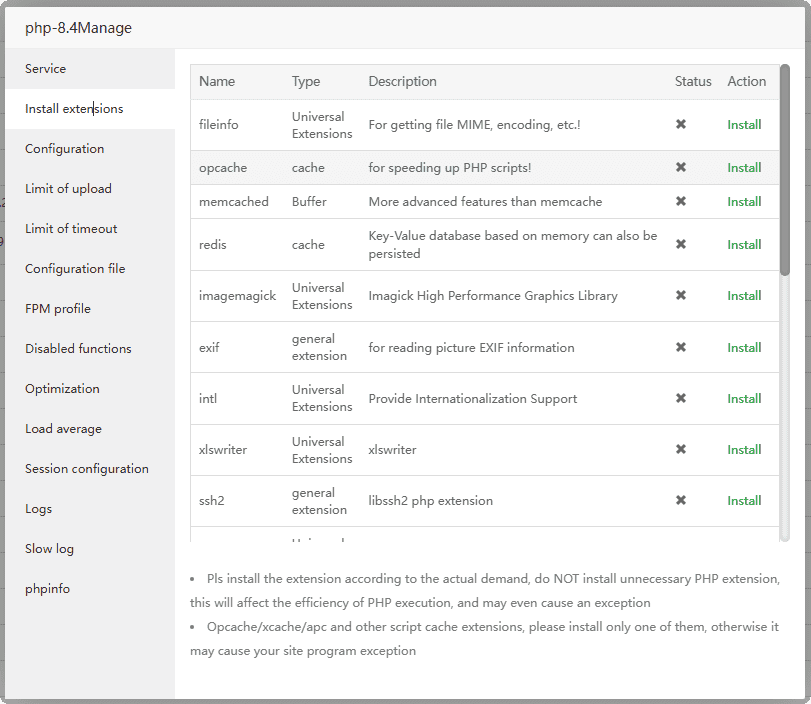
Manage modules for the PHP version assigned to RKHM. Screenshot: aaPanel documentation.
2. Create the RKHM PHP site and local database
Open Website → PHP Project → Add site → Create site. Enter the final hostname, choose the installed PHP 8.3, and use a site path such as /www/wwwroot/music.example.com. Select Database → MySQL to create the local database while adding the site, or create it later under Databases → MySQL → Add DB. Record the database name, user, and password. The PHP Project guide lists these fields and paths.
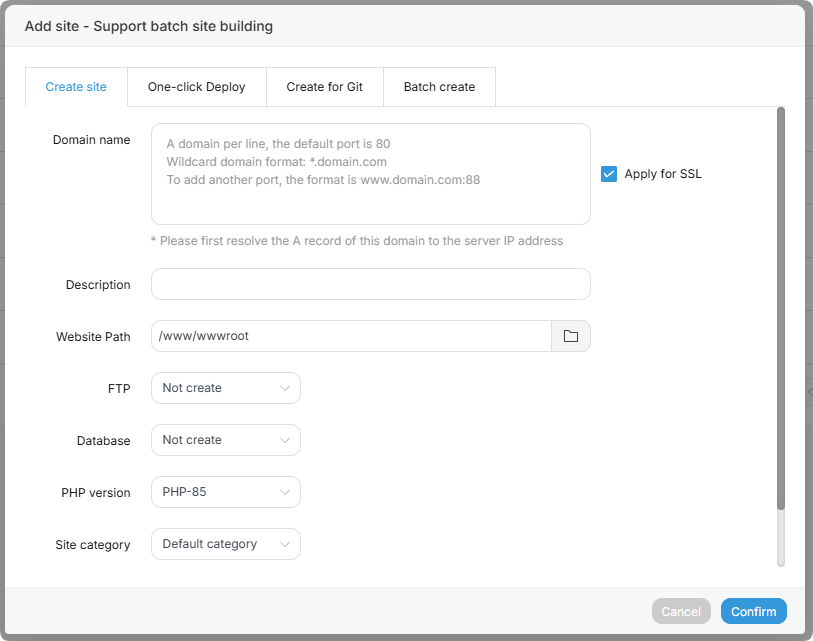
Create a PHP website with the final domain, path, PHP version, and database. Screenshot: aaPanel documentation.
For a separate database creation, choose a local MySQL database and set its user permission to Local server. aaPanel's MySQL guide says this limits access to localhost or 127.0.0.1. In RKHM's Database step, use the actual local host and the credentials saved in aaPanel. Do not use the MySQL root account for RKHM.
In Cloudflare DNS, set the A record for music (or @ for the main domain) to this server's public IPv4. Keep it DNS only while setting up RKHM. Our Ubuntu guide has the Cloudflare apex and subdomain walkthrough. Add the same hostname to aaPanel's site; aaPanel does not automatically add www, so configure it separately if wanted.
3. Upload RKHM and enable HTTPS
Open the site's Path in aaPanel's Files view. Upload the complete RKHM ZIP and use Unzip. Move its contents into the website path so index.php, api/, admin/, installer/, and the root .htaccess are directly under the site root. The aaPanel Files guide covers upload, extraction, owners, and permissions. Keep the original RKHM .htaccess files in every supplied directory.
aaPanel's PHP Project guide says an Apache site uses its .htaccess by default. Leave RKHM's rewrite rules in place, and do not replace them with a generic CMS rewrite template. If the installer reports that .htaccess is missing or not working, check that Apache serves this site, the files were extracted with their leading dots, and the site root is correct.
Once DNS reaches the site, open its SSL setting and issue a Let's Encrypt certificate using file validation or another certificate for the exact hostname. aaPanel's SSL documentation notes that file validation needs the domain to resolve and the site to be reachable. Confirm HTTPS at the origin before entering the final https:// URL in RKHM. If Cloudflare proxying is enabled later, use a valid origin certificate and Full (strict) mode.
4. Add RKHM's cron task
In aaPanel's PHP Project → PHP CLI, set the command-line PHP version to match the site's PHP 8.3. The PHP CLI setting must be revisited after installing a new PHP version. In Cron → Add Task, choose Shell Script, name it RKHM, select N Minutes: 1, and paste the command from RKHM's Server step. aaPanel's Cron guide shows the task fields.
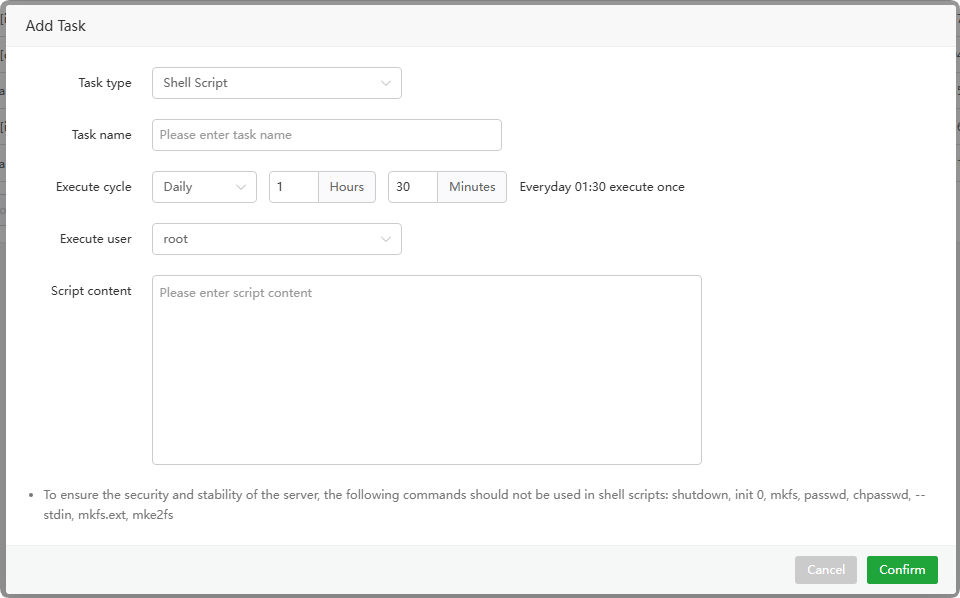
Use a Shell Script task so RKHM's PHP script receives its required argument. Screenshot: aaPanel documentation.
Use the exact RKHM installation path. aaPanel documents the PHP 8.3 binary as /www/server/php/83/bin/php in its PHP path guide. A typical command is:
/www/server/php/83/bin/php -f /www/wwwroot/music.example.com/api/admin.php bof_cronjobs=yesChoose the website's www user for the task if aaPanel offers an execution-user selector and your files belong to www. Run the task once from the Cron page, inspect its Log, then refresh RKHM's Server step after a minute. If it fails, check the file path, CLI PHP modules, and permissions. Use separate aaPanel Backup Site and Backup Database tasks if you want panel-managed backups.
5. Complete RKHM and check the server
Finish the installer, verify licence and rewrite checks, remove the installer directory, and complete First run. Confirm HTTPS, API routes, admin sign-in, a representative upload, and cron status. Check PHP and Apache error logs in aaPanel if a requirement is red. Keep restorable backups of the database and media files, and review the optional FFmpeg, search, image, download, and Node.js settings in the Ubuntu RKHM guide when those tools are installed on this server.