



Installation - Server
Cronjob, .htaccess files and timezone
In this step, script will check cronjob status, .htaccess files & timezone. You have to setup a cronjob and make sure all .htaccess files are uploaded
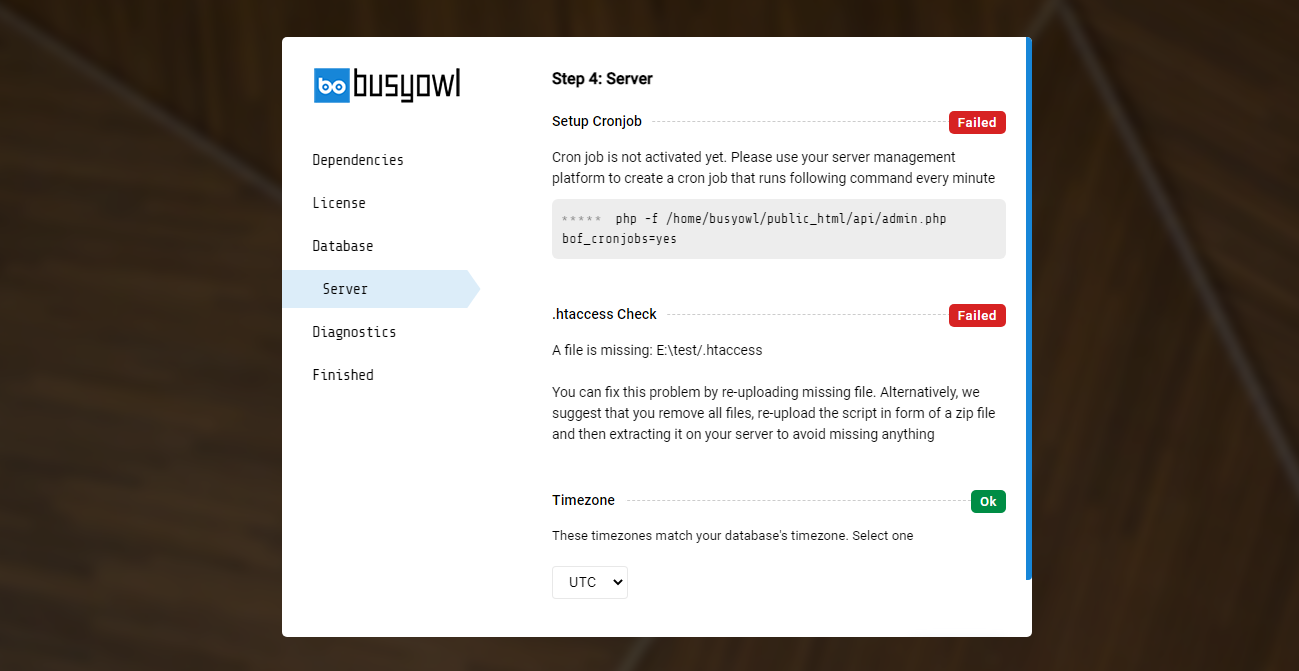
Cronjob
What a cronjob actually is, and why RKHM needs one
A cronjob is just a scheduled command your server runs on its own, on a timer — the same mechanism behind almost every "happens automatically in the background" feature on any web application, not something specific to RKHM. Your web server only runs code when a browser actually requests a page; nothing else happens by itself unless something else triggers it. A cronjob is that something else: your hosting's own scheduler calls one specific RKHM command on an interval you set (once a minute is standard), and that single call is what lets RKHM check "is anything due to run right now?" and run it if so.
Cronjob allows RKHM to execute specific tasks in background and on a schedule. Database optimization, file cleaning, file-background-processing, many automation methods and etc depend on cronjob to be executed. Script can't function long-term without cronjobs
Without a working cronjob, everything a visitor triggers directly (browsing, uploading, buying) still works — but nothing that's supposed to happen by itself does. It doesn't run late; it doesn't run at all, forever, until a cronjob actually calls in.
How to check it's actually running
The clearest way to know whether your cronjob setup works is to run the exact same command by hand, once, from a terminal (SSH, or your host's command-line tool). This bypasses the installer and your hosting panel's cron UI entirely, so it isolates exactly one question: does this command, run right now, do anything?
- Copy the exact command the installer showed you — it already has your real path filled in and looks like
php -f /path_to_rkhm/api/admin.php bof_cronjobs=yes. - Run it directly in your terminal. If you get a shell-level error before anything else —
command not found, or a PHP error about a missing extension — that's your server's PHP CLI itself being misconfigured, not a RKHM problem. See "Cronjob common issues" below. - If the command runs and prints something, read what it says — RKHM prints one line per scheduled task, either that it ran or that it's skipping this one because it isn't due yet on its own interval. That output is the real diagnostic: if a task you expect never shows as run even after a few manual calls a minute or more apart, something about that specific task is the problem, not your cron setup in general.
- Once you've confirmed the command itself works by hand, the only thing left is getting your host's scheduler to call it automatically and repeatedly — see the setup steps below for cPanel, or ask your host how to schedule a command to run every minute if they use something else.
Cronjob common issues
PHP might not be accessible with the php -f command in some setups. Try replacing it with common absolute paths such as /usr/local/bin/php or /usr/bin/php . For example change command from "php -f /path_to_rkhm/api/admin.php bof_cronjobs=yes" to "/usr/local/bin/php -f /path_to_rkhm/api/admin.php bof_cronjobs=yes" and try again
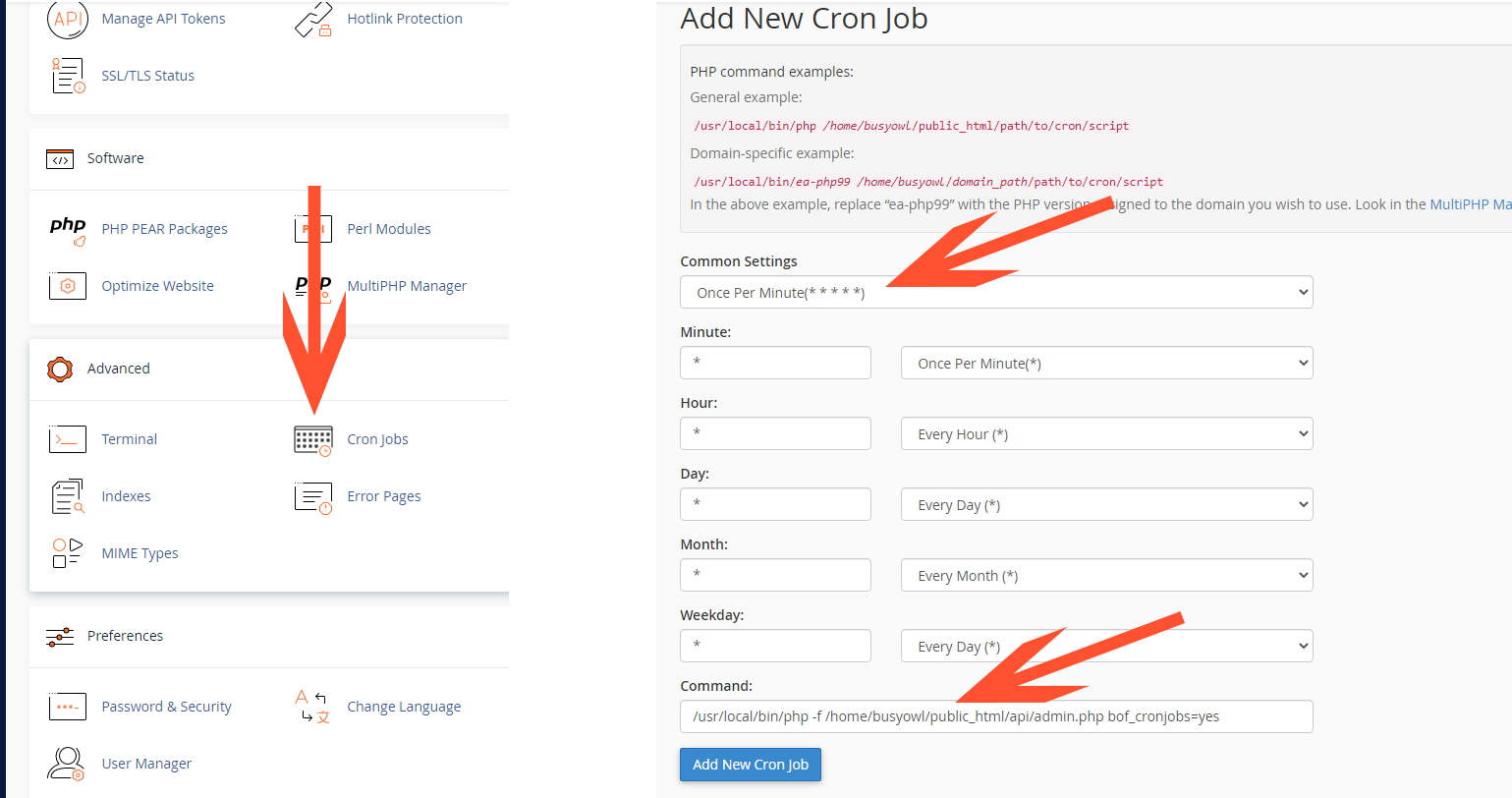
How to setup cronjob in cPanel
- Head to your website's cPanel and login. Find and click on Cron Jobs
- In the new page, choose "Once Per Minute" as "Common settings"
- Enter php -f /path_to_rkhm/api/admin.php bof_cronjobs=yes ( not this string, copy the command from installer ) in command input
- Click on "Add new cron job"
Some hosting providers, like OVH do not accept parameters along with php file path. In those cases, instead of passing /path_to_rkhm/api/admin.php bof_cronjobs=yes you may just pass /path_to_rkhm/api/app/admin/cronjob.php
.htaccess
RKHM relies on .htaccess files — several of them, in different folders, not just one in the root — to tell your Apache web server how to route requests to its actual files. Without them working, most requests fail, usually as a 404 or a broken-looking page, because the web server has no idea RKHM's URLs are supposed to map to anything.
Missing, corrupted, or not working — three different problems, three different fixes
Missing — the installer names a specific file as missing. That exact .htaccess file never reached your server at all. This is almost always because it got left out when you zipped the files for upload — .htaccess files are hidden by default in most file managers and some zip tools, so "select all, zip" can silently skip them even when you meant to include everything. Go back to your original download, re-zip with hidden files visible and included, and re-upload the missing file (or the whole thing).
Corrupted — the installer names a specific file as corrupted. Despite how that sounds, this doesn't mean malware or damage: the installer checks each .htaccess file against an exact checksum of what actually shipped, and "corrupted" simply means the file on your server doesn't match that, byte for byte. This reliably happens when an FTP client or file manager silently changes the file in transit — converting line endings, or re-saving it through a text editor. If you see this error, the fix is always the same: re-upload the original, unmodified .htaccess file. There's nothing to repair — a corrupted file needs to be replaced with a clean copy, not edited.
Not working — every file is present and passes the corruption check, but requests still fail. This means your web server isn't reading .htaccess files at all, which is a server configuration issue rather than a file problem — most commonly Apache's AllowOverride being set to None for your site, or your server actually running Nginx (which ignores .htaccess entirely — see the Nginx article for the equivalent rewrite rules). Re-uploading anything will not fix this; you need your host to enable .htaccess support for your site, or to apply the Nginx configuration if that's what you're actually running.
Timezone
The installer lists every timezone whose current time matches your MySQL server's clock. Pick the one you want RKHM to use for dates and schedules; it is saved in api/app/config_user.php. You can change it later under Setting → General → License → Timezone (added in v2.1.04).
If the installer says We failed to find a valid timezone that matches your MySQL timezone, your database server's clock is wrong or set to an unusual offset. Ask your host to correct the MySQL server time, then reload the installer.
Diagnostics
After the server checks, the installer asks what to share with Busyowl:
- Necessary: your purchase code, web address and plugin list, sent when RKHM checks your license, updates and plugins. Nothing else.
- Basic: everything in Necessary, plus PHP errors (message, file, line and call trace), so we can fix bugs you run into.
- Advanced: the same as Basic today. It is reserved for a summary of your website's statistics.
You can change this later under Setting → General → License → Diagnostics (added in v2.1.04).
Finish
On the last screen, delete the installer folder from your server, then sign in at yourwebsite.com/admin/ with the admin email and password you entered in the Database step.