



Installing RKHM with CyberPanel (OpenLiteSpeed)
OpenLiteSpeed routing, PHP, SSL, and cron
This guide installs RKHM on a VPS managed by CyberPanel with OpenLiteSpeed. OpenLiteSpeed can run RKHM, but its handling of Apache .htaccess directives differs from Apache's. RKHM also verifies the exact contents of its bundled .htaccess files. Plan to configure routing and access control in the site's OpenLiteSpeed virtual host, then follow RKHM's standard installer. You need CyberPanel administrator access to edit the virtual host.
Before you start
- Have CyberPanel installed on a server you control, the complete RKHM release package and purchase code, the final domain, and CyberPanel administrator access. CyberPanel's Create Website guide describes the current site form.
- Create a Cloudflare A record for
music(or@for the main domain) pointing to the server's public IPv4. Use DNS only while issuing the certificate and checking the origin. See RKHM's Ubuntu guide for the Cloudflare steps. Permit ports 80 and 443 publicly, and limit CyberPanel's management port 8090 to trusted administrators. - The example hostname is
music.example.comwith a document root of/home/music.example.com/public_html. Confirm the real root in your website's settings before copying any commands.
1. Create the site and set PHP
In Websites → Create Website (or the Dashboard's Create Website shortcut), select a package and owner, enter the final domain and email address, and choose PHP 8.3 or newer (RKHM requires it since v2.1.04). Leave the optional Apache backend off for this OpenLiteSpeed recipe. Enable a mail domain only if you intend CyberPanel to host mail. CyberPanel's website creation guide explains the fields and says you can change PHP later.
Open Server → PHP → Install Extensions, select the site's PHP version, and confirm curl, mysqli, mbstring, gd, and zip. CyberPanel's PHP extension guide shows this screen. Check allow_url_fopen, upload and POST limits, memory, and execution time against RKHM's Requirements step. A large media import may need higher limits than a default site.
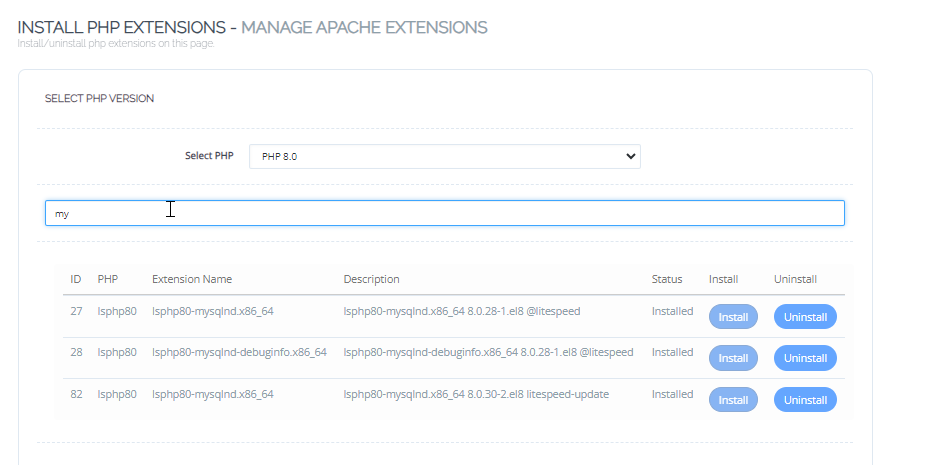
Select the PHP version assigned to RKHM before managing extensions. Screenshot: CyberPanel documentation.
2. Create the database and upload RKHM
Open Databases & FTP → Create/Delete Database, select the website, and create a database user and strong password. CyberPanel prefixes the final database and username; use the complete names it displays in RKHM's Database step. Its database guide shows the current workflow. Use the local database host shown by CyberPanel; do not use the MySQL master account for RKHM.
Open Websites → List Websites → File Manager for the RKHM site. Upload and extract the entire release into public_html, so index.php, api/, admin/, installer/, and the root .htaccess sit directly in that folder. CyberPanel's File Manager guide shows upload and navigation. Preserve every supplied .htaccess file and its original contents, including files under api/, admin/, and BOF/. The RKHM installer checks their hashes and will reject a changed file.
3. Configure OpenLiteSpeed routing and protection
Open Websites → List Websites → Manage → Full Settings → vHost Conf (the label may simply be vHost Conf in older CyberPanel screens). CyberPanel's Website Home guide puts configuration files and rewrite controls under Full Settings. Save a copy of the virtual-host configuration first. Work in its existing rewrite { ... } section, retaining any CyberPanel-generated HTTPS or ACME rules. Do not paste the rules below into CyberPanel's Rewrite Rules editor: that editor can write to the root .htaccess, which RKHM checks byte for byte.
For this self-contained virtual-host route, keep enable 1, set autoLoadHtaccess 0, and remove a rewriteFile .../.htaccess reference if your existing rewrite section contains one. Keep existing certificate and redirect rules outside that file reference. Add the following rules inside the existing rules <<<END_rules block, before END_rules; create that rules block inside rewrite { ... } if your vhost does not have one. These patterns start with / because OpenLiteSpeed virtual-host rewrite rules match the URL path with its leading slash. They consolidate the root, admin, API and protected-media behavior from RKHM's supplied Apache rules and NGINX guide.
RewriteRule ^/(api/app|BOF/app/core)(/|$) - [F,L,NC]
RewriteRule ^/.*\.(htaccess|env|ini|log)$ - [F,L,NC]
RewriteRule ^/\.(git|svn|hg)(/|$) - [F,L,NC]
RewriteRule ^/files/protected/(.*)$ /protector.php?path=$1 [L,QSA]

RewriteCond %{REQUEST_FILENAME} !-f
RewriteCond %{REQUEST_FILENAME} !-d
RewriteRule ^/api/be/(.*)$ /api/admin.php?q=$1 [L,QSA]

RewriteCond %{REQUEST_FILENAME} !-f
RewriteCond %{REQUEST_FILENAME} !-d
RewriteRule ^/api/(.*)$ /api/index.php?q=$1 [L,QSA]

RewriteCond %{REQUEST_FILENAME} !-f
RewriteCond %{REQUEST_FILENAME} !-d
RewriteRule ^/admin/(.*)$ /admin/index.php?q=$1 [L,QSA]

RewriteCond %{REQUEST_FILENAME} !-f
RewriteCond %{REQUEST_FILENAME} !-d
RewriteRule ^/(.*)$ /index.php?q=$1 [L,QSA]
Put the deny and protected-media rules first. OpenLiteSpeed's Access Control guide uses [F,L] to block directories and explains that plain OpenLiteSpeed ignores access directives in .htaccess. The four route fallbacks then leave real files and directories alone. Preserve the virtual host's PHP handler, document root, SSL, logs, and existing ACME/HTTPS redirect rules. Save the vhost and restart OpenLiteSpeed as directed by CyberPanel's rewrite guide.
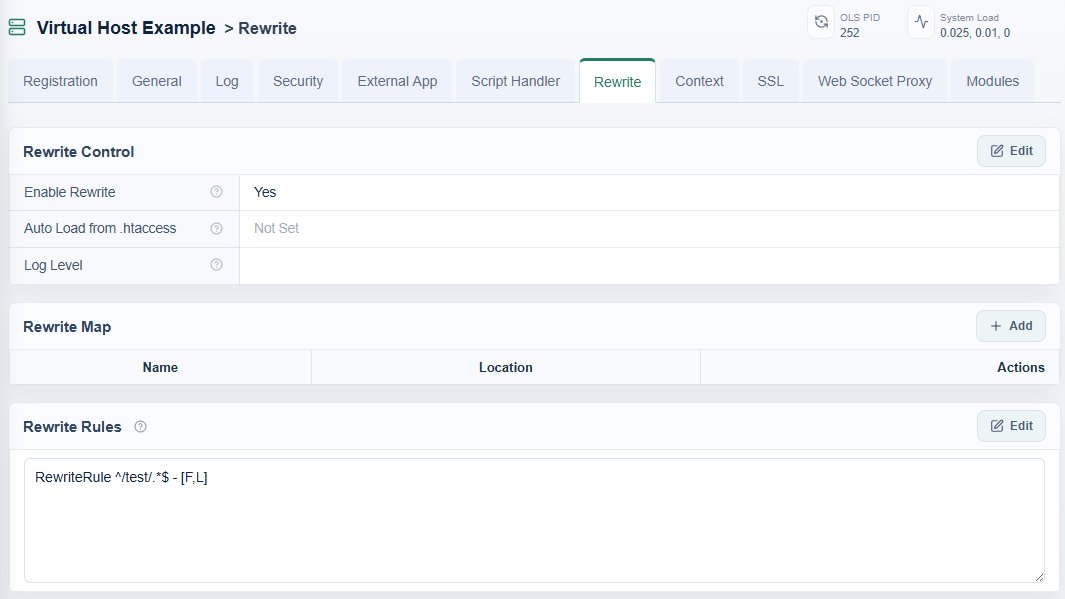
Virtual-host rules can enforce access controls without altering RKHM's bundled files. Screenshot: OpenLiteSpeed documentation.
After the restart, check that /api/client_config returns RKHM's JSON response, admin routes load, and /api/app/ and /BOF/app/core/ return 403. A direct request for any .htaccess should also be denied. Check a protected-media URL without authorization; it must not serve the underlying file. RKHM's installer labels a failed API route as a .htaccess problem even when the OpenLiteSpeed virtual-host routing is the actual issue.
4. Enable HTTPS and complete the installer
After DNS reaches this server, open Security → Manage SSL, select the site, and choose Issue SSL. CyberPanel's current SSL guide requires the A/AAAA records and public ports 80/443 to be correct; if validation fails behind Cloudflare, use DNS-only mode during issuance. Confirm the browser trusts the origin certificate, then use the final https:// URL for RKHM's installer. If Cloudflare proxying is enabled later, use Full (strict) with a valid origin certificate.
Complete RKHM's database, license, and server steps. If the installer reports a corrupted .htaccess file, restore it from the release ZIP and keep the custom rules in the virtual host. If the API route fails, inspect the vhost rewrite order and OpenLiteSpeed logs; do not change the release's .htaccess files to make the check pass.
5. Add the one-minute RKHM cron job
Open the site's Cron Jobs → Add Cron. Set minute to * and hour, day, month, and weekday to *. CyberPanel's Cron Jobs guide shows these fields and the Fetch Current Cron Jobs view. Use the exact RKHM command shown in its Server step, with the PHP CLI binary that matches the website's PHP version. CyberPanel's CLI PHP guide recommends a versioned binary for cron instead of changing the global PHP command.
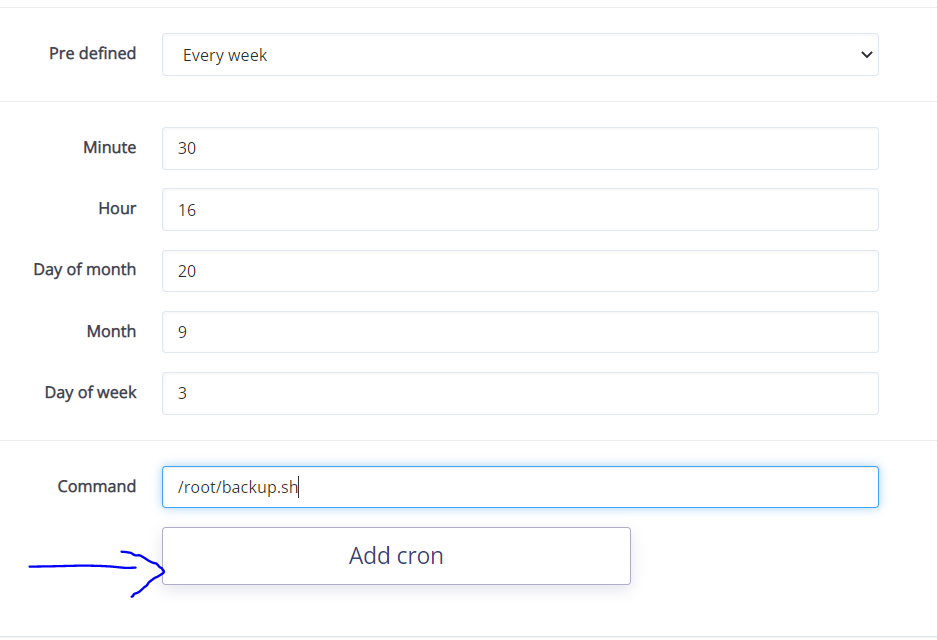
Schedule the RKHM PHP command every minute. Screenshot: CyberPanel documentation.
With PHP 8.3 and the example path, the command is:
/usr/local/lsws/lsphp83/bin/php -f /home/music.example.com/public_html/api/admin.php bof_cronjobs=yesVerify the binary exists on your server and run the command once as the website user. In CyberPanel, fetch current cron jobs and check the task's output; refresh RKHM's Server step after a minute. If it fails, inspect file ownership, CLI PHP modules, and the absolute paths.
Checks before going live
- Remove the installer directory after setup, complete First run, then verify HTTPS, admin sign-in, API responses, upload, scheduled tasks, and a protected-media request.
- OpenLiteSpeed applies rewrite rules from a vhost, but does not apply RKHM's Apache
Header,ForceType, or other non-rewrite.htaccessdirectives by default. Verify mediaContent-Typefor MP3/HLS and service-worker cache headers in the browser; configure needed response headers in the vhost using the OpenLiteSpeed headers guide. - Keep restorable off-server copies of the database, uploaded media, application files, and the working vhost. Recheck the custom vhost rules after CyberPanel changes to the website or web-server mode. The Ubuntu guide covers optional FFmpeg, Meilisearch, yt-dlp, image-format, and Node.js tools once the base installation is running.