


Music suggestions
Personal shelves built from what each listener plays
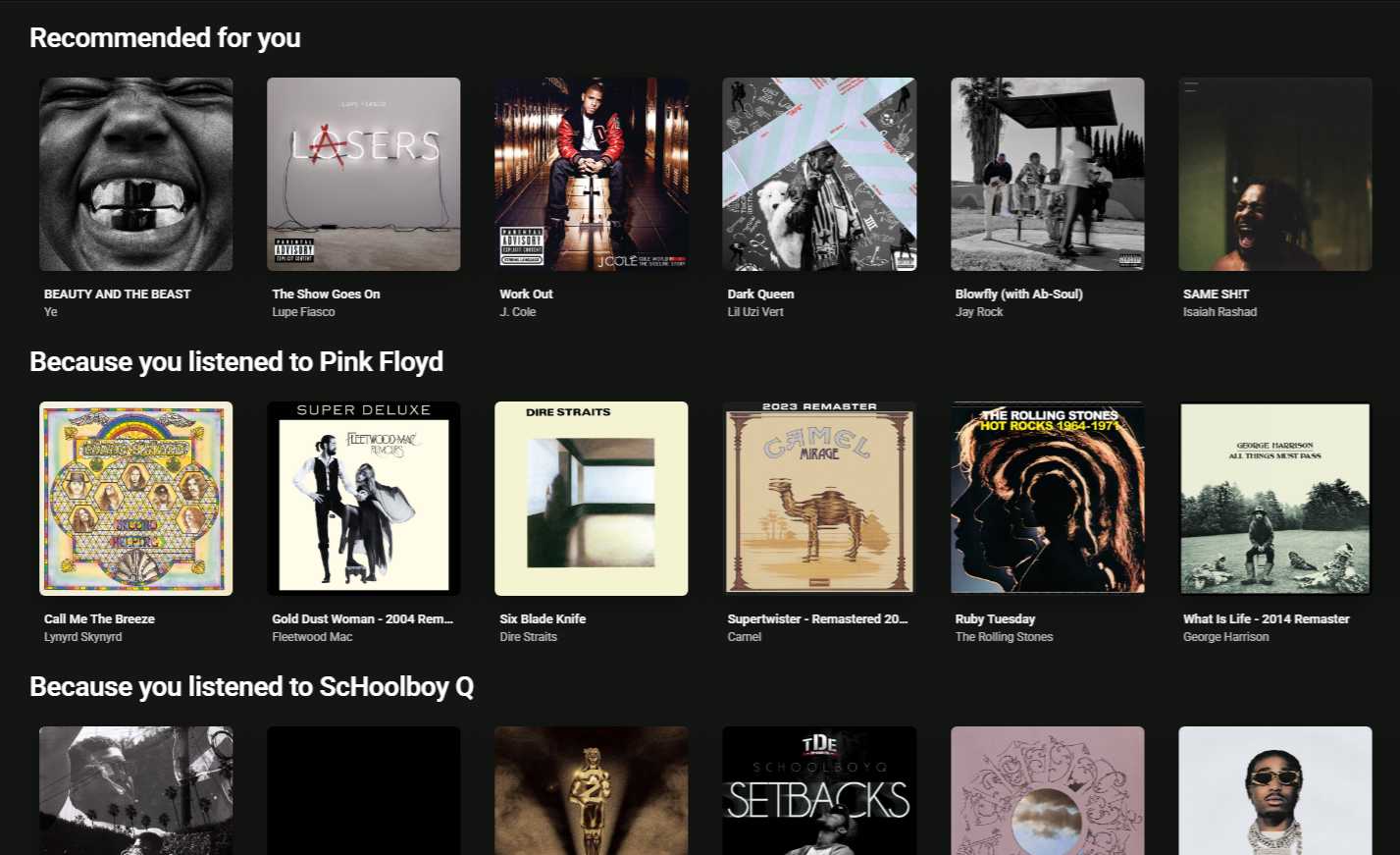
Music suggestions gives every signed-in listener their own shelves of music, such as On repeat, Because you listened to … and Artists you might like. The shelves are built in the background from what each listener plays, follows, likes and skips. You don't pick anything by hand. You switch the feature on, choose which shelves to use and where they appear, and optionally connect outside sources of similar-artist data.
How it works
The system works in three stages:
- Collect. Plays, follows, likes, playlist adds, dislikes and early skips are recorded as people use your site.
- Build. A background cron job called Content suggestions works out each listener's shelves on a schedule and stores them. No outside service is called while shelves are built. Similar-artist data from Last.fm or ListenBrainz is collected beforehand by a separate job (see Similar artists below).
- Show. Pages only read the shelves that are already stored, so a suggestion shelf loads like any other widget. Just before a shelf is shown, items the listener has disliked since the last build are removed, and so are items they have played since then (where played items are hidden). A dislike or a new play therefore shows up straight away, without waiting for the next rebuild.
Who sees suggestions
- Signed-in listeners only. Nothing is built for guests, and a Suggestion widget shows nothing to them.
- Listeners with some activity. A signed-in listener with no plays, follows, likes or playlist adds gets no shelves. This is deliberate: there is no "trending" or "popular" fallback, because every shelf starts from the listener's own history. For brand-new listeners, use the get-started page described below, and keep your regular content widgets on your pages.
Where shelves appear
| Place | What it shows | Good to know |
| Suggestion widget (PageBuilder) | The listener's next shelf, in shelf order | It has its own Suggestion group in the widget list. It has no title or subtitle inputs, because each shelf brings its own title. It shows up to the widget's item limit (default 20) and respects the widget's role include/exclude. If a shelf has too few items, the widget moves on to the next shelf. It shows nothing to guests or to listeners without shelves |
| Library → For you tab | Every shelf, one row per shelf, up to 20 items each | The tab only appears once the listener has at least one shelf. When Last.fm is in use, it ends with the "Powered by AudioScrobbler" credit (see Last.fm below) |
| Get-started page, last step | Up to 8 shelves built at that moment | Only for new listeners, and only if you switch the page on |
You can place several Suggestion widgets on one page. Each one shows the next shelf in line, so three widgets show three different shelves without any per-widget setup.
What activity counts
For each listener, RKHM scores artists from their activity. The highest-scoring artists, up to 50, become that listener's top artists, and most shelves start from them.
| Activity | Points for the artist |
| Each play among the listener's last 2,000 track plays | +1, or +2 if it was in the last 30 days |
| Following the artist | +5 |
| Liking one of the artist's tracks | +3 |
| Liking one of the artist's albums | +4 |
| Adding one of the artist's tracks to a playlist | +1 |
| Disliking one of the artist's tracks | −3 |
| Each early skip of one of the artist's tracks | −0.5 |
- An artist the listener has disliked, or whose score is 0 or less, is never a top artist.
- A play is recorded once a track has played for a few seconds, the same way plays are counted elsewhere on your site.
- An early skip means a signed-in listener stopped a music track or moved on between 2 and 29 seconds into it. If the same track is restarted in another session within 15 seconds, that is a source or quality switch and is not counted. Skip records are kept for 180 days and are deleted with the user.
- Liked genres only affect the genre shelf (see Genre likes).
How shelves are built
Every Run every minutes, the Content suggestions job checks which listeners are due for a rebuild under your Rebuild by activity rules. It starts with the most recently online and handles up to Max users per run, within Max seconds per run. Anyone left over waits for the next run. For each listener it builds the enabled shelves in their Order, filtering as it goes:
- No repeats across shelves. If two shelves would show the same item, the shelf that comes first in Order keeps it.
- Disliked items are removed. This always applies.
- Already-played tracks are removed, but only on the discovery shelves (Recommended for you, Because you listened to, More from artists you love, Top genre picks) and only while Hide items the user has already played is on. A track counts as played if the listener has played it, or has skipped it early two or more times without liking it.
- Unplayable items are removed, but only while Only suggest playable items is on.
- The shelf is cut to Max items. If fewer than Min items are left, the shelf is not shown.
If one shelf fails to build, the listener keeps that shelf's previous version.
What counts as playable
- A track is playable if it has a stored playable source.
- When YouTube or SoundCloud is enabled as a music source on the Music Automation page, a track with a Spotify ID also counts as playable.
- An album is playable if at least one of its tracks is. Artists always count as playable.
- Playability is checked only when shelves are built, not again when they are shown.
Music-specific clean-ups
- One copy of a song. Tracks by the same artist with the same title count as one song. Bracketed parts and " - …" endings are ignored, so "Song (Remix)" and "Song" are treated as the same song.
- At most 2 tracks per artist on the discovery shelves.
- An artist's best tracks. When a shelf needs tracks by an artist, it picks from that artist's 20 most played tracks on your site, then by Spotify popularity. With Only suggest playable items on, only playable tracks are used.
- Daily rotation. The discovery shelves and Artists you might like shuffle their 60 best candidates, using the date and the listener to decide the shuffle. So a shelf changes from day to day when it is rebuilt, but it doesn't change randomly on every page view.
The eight shelves
| Shelf | What it shows | Its own settings (default) | Enabled / Order / Max items / Min items | Hides played tracks? |
| On repeat | Tracks the listener has played most recently | Played in the last (days): 30; Minimum plays: 3 | on / 10 / 20 / 3 | No |
| New from your artists | Albums and singles released in the last N days (up to today) by the listener's top artists and followed artists. If a single and an album have the same title, the album is shown | Released in the last (days): 30; Top artists to use: 10 | on / 20 / 20 / 1 | No |
| Recommended for you | Tracks by artists similar to the listener's top artists, scored across all of them. Artists the listener skipped early 3 or more times and never played are left out | Top artists to use: 10 | on / 30 / 20 / 4 | Yes |
| Because you listened to … | One shelf per top artist, with tracks by that artist's similar artists | Max shelves: 2 | on / 40 / 20 / 4 | Yes |
| More from artists you love | Tracks by the listener's top artists that they haven't played | Top artists to use: 10 | on / 50 / 20 / 4 | Yes |
| Artists you might like | Similar artists the listener doesn't follow, hasn't disliked, has never played and hasn't skipped 3 or more times | Top artists to use: 10 | on / 60 / 20 / 4 | Not applicable (shows artists) |
| Top genre picks (shown as "Top Genre picks for you") | The listener's genres, ranked by their listening, with liked genres counting extra. For each genre it takes the 40 most popular artists and shows their best tracks. Genres come from artists, albums and played tracks | Max shelves: 2; Minimum artists in genre: 2 | on / 70 / 20 / 4 | Yes |
| Forgotten favourites | Tracks the listener has played 5 or more times, or liked, and hasn't played in the last 60 days | Minimum plays: 5; Not played for (days): 60 | on / 80 / 20 / 3 | No |
- Recommended for you, Because you listened to … and Artists you might like need similar-artist data. A top artist with no similar artists adds nothing to these shelves, and there is no fallback by genre. See Similar artists below.
- "Because you listened to X" or "Because you follow X". The title uses "Because you follow X" whenever X is not among the listener's recent plays. This also happens when the interest in X came from a liked track or album or a playlist add, so the title can say "follow" for an artist the listener does not actually follow.
- Forgotten favourites includes liked tracks the listener hasn't played in the last 60 days. That includes a track they liked recently but never played, so the shelf is not limited to music they have drifted away from.
- New from your artists depends on albums having release dates.
Settings
All suggestion settings are on Admin area → Settings → User → Suggestions. The similar-artist sources are configured separately, on the Music Automation page (see Similar artists).
Suggestions
| Setting | Default | Tip shown in the admin area |
| Enabled | Off | Turns suggestions on or off. Shelves are built for signed-in users only and show up where a Suggestion widget is placed |
| Run every (minutes) | 60 | How often the cron job checks for users to rebuild. The rules below decide who gets rebuilt |
| Max users per run | 100 | The rest wait for the next run |
| Max seconds per run | 60 | Long runs hold up other cron jobs such as uploads and search indexing. Big sites can run it separately with solojob=suggestions |
| Hide items the user has already played | On | Played items are removed when shelves are built and again when they are shown. Some shelves always show played items |
| Only suggest playable items | On | Leaves out items that have nothing to play |
Shelves also appear in the Library For you tab, even if you don't place a Suggestion widget anywhere.
Get started
| Setting | Default | Tip shown in the admin area |
| Get started page for new listeners | Off | Signed-in users with no follows, no likes and fewer plays than below are taken once to a page where they pick genres and artists, from the home page, their profile or their library. Picked artists are followed and picked genres liked; from then on suggestions come from what they play. They can skip it. It is not shown when fewer than 12 artists have a cover |
| Not asked after (plays) | 5 | Users who have played this many tracks are not asked |
Rebuild by activity
| Rule | Last online within (days) | Rebuild every (hours) |
| 1 | 1 | 6 |
| 2 | 7 | 24 |
| 3 | 30 | 168 |
| Everyone else | — | Empty (never) |
Keep the rules in increasing order. Listeners covered by Everyone else are not rebuilt while that field is empty. They are rebuilt once they come back and fall under one of the rules again.
One group per shelf
Each of the eight shelves has its own group with Enabled, Order, Max items and Min items, plus the shelf's own settings listed in the table above. The Order tip reads: "Lower numbers come first. Each Suggestion widget on a page shows the next shelf. If two shelves have the same item, the first one keeps it."
The tip on the similar-artist shelves mentions Last.fm and ListenBrainz "if enabled in Music settings". Those switches are on the Music Automation page. These shelves also use similar artists worked out from your own listeners, which the tip doesn't mention.
Dislike
While suggestions are switched on, listeners can dislike tracks and artists. Dislike (and Remove dislike to undo it) is in the item menu: right-click, long-press, or the "more" button on cards, rows, queue items and single pages. A dislike is private. There is no public counter.
- A disliked track leaves every shelf straight away, including On repeat and Forgotten favourites. Endless play never picks it, and its artist loses 3 points. Disliking a track also removes the listener's like on it.
- A disliked artist is never a top artist and never suggested. Their tracks and albums leave every shelf, and so do "Because you listened to …" shelves based on them. Endless play skips them, and they are left out of the get-started page.
- Disliking an artist removes the follow, and following the artist again removes the dislike.
- When a listener dislikes something from a shelf card, the card disappears from the page at once.
- A dislike does not affect anything the listener starts on purpose, such as an album, a playlist, a search result or their own queue.
- To undo a dislike, the listener uses the same menu entry. There is no list of disliked items.
Genre likes
While suggestions are switched on, genre pages get a Like button, and Like is also in a genre's item menu. Liked genres appear in the listener's library Likes tab. Each liked genre counts extra on the Top genre picks shelf, even if the listener hasn't played much in it yet.
The get-started page
The get-started page helps new listeners get shelves before they have any history. To use it, switch on both Suggestions and Get started page for new listeners. A listener is sent there when all of these are true:
- They are signed in and have never finished or skipped the page.
- They follow no artists and have no liked tracks, albums or genres.
- They have played fewer tracks than Not asked after (plays).
- Your site has at least 12 artists with tracks and a cover.
- They are on the home page, their own profile or their library.
They are sent there once per browser session until they finish it or press Skip. Skip is final. With the feature off, the page address (/get_started) shows "Not found".
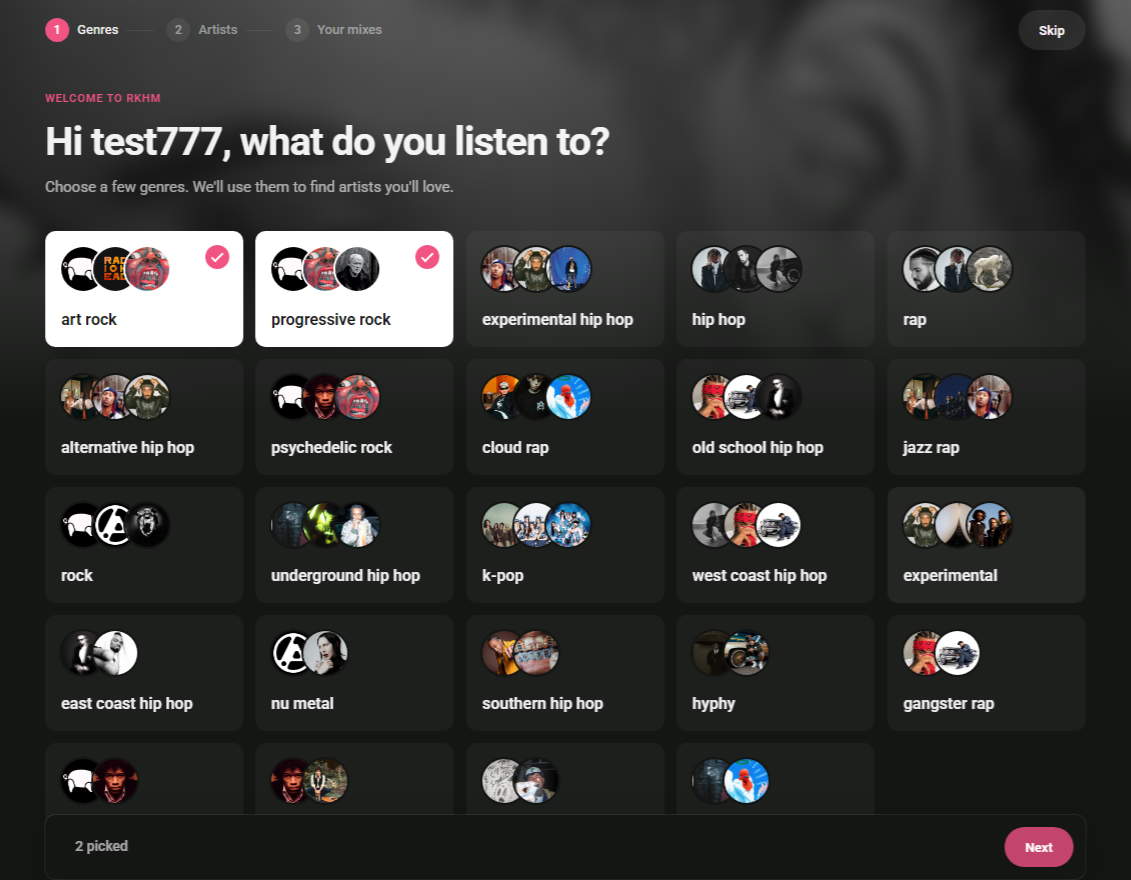
- Genres. Up to 24 genres with the most artists to choose from, each shown with three artist faces. This step only appears when at least 3 genres qualify.
- Artists. Up to 60 artists, most-followed first, then the most popular, with a search box. Each pick slides in up to 4 similar artists. At least one pick is required, and three or more is recommended.
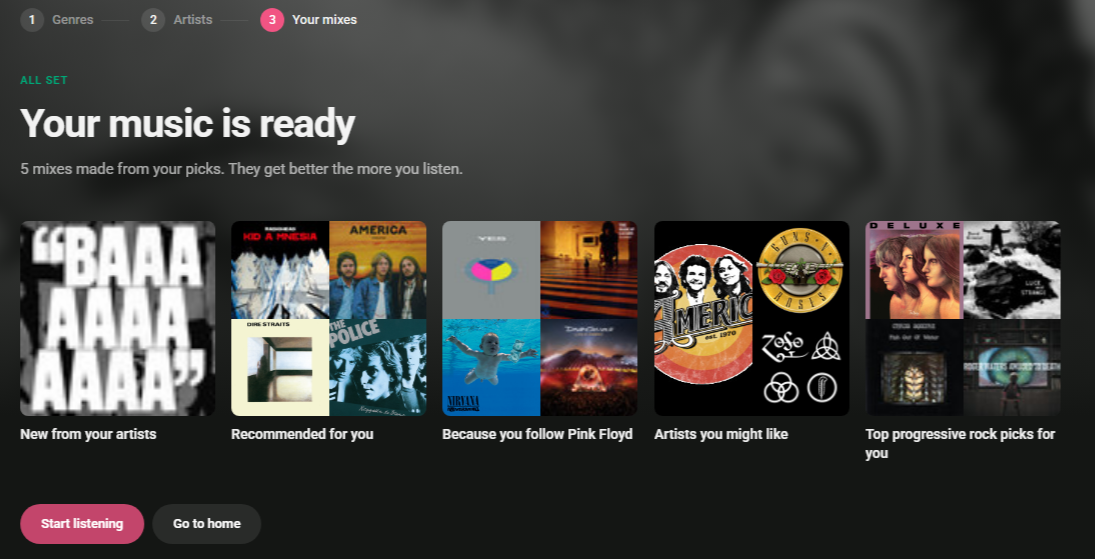
- Your music is ready. Shows the shelves that were just built, with a Start listening button that opens the For you tab.
On small sites with 40 or fewer artists to choose from, every artist is shown on one screen, with no search and no genre step.
Picks are saved as real follows and genre likes, so they behave like any other follow or like afterwards. Admins get one notification for the whole set of picks, not one per artist. Shelves are built right away. If a picked artist has no similar artists yet, the listener is rebuilt again on the next cron run.
Endless play
When a listener starts a track from a Suggestion widget or the For you tab and their queue runs out, playback continues with their other suggested tracks in shelf order. That's up to 300 tracks across all shelves, minus tracks already in the queue. In every other case, endless play works as before (see Multimedia files (player)), except that disliked tracks and artists are never picked.
Similar artists
Three shelves depend on knowing which artists are similar: Recommended for you, Because you listened to … and Artists you might like. RKHM uses up to four sources. Each is stored separately, so the similar artists you pick yourself are never overwritten.
| Source | Weight | What it needs |
| Your own picks — Related artists in the artist editor | Highest | Nothing |
| Last.fm | High | Your own Last.fm API key |
| This site's listeners | High | Enough real listeners on your site |
| ListenBrainz | Lower | A MusicBrainz ID for the artist, looked up automatically |
- Similar artists from Last.fm and ListenBrainz are matched to artists in your catalogue by MusicBrainz ID first, then by name. Up to 30 matches are kept per artist per source. Names that don't match any of your artists are skipped, unless Create missing artists is on.
- Related artists added by a MusicBrainz cronjob with Get related artists (which can include band members and relatives) are treated as if you picked them yourself. See Music Automation.
- Similar artists ranked higher by their source count for more. Results are added up across all of a listener's top artists, with their strongest top artists counting up to twice as much.
The Similar artists job
A cron job called Music Plugin - Similar artists collects this data. It is only listed while Suggestions → Enabled is on, so with Suggestions off nothing is fetched, even if Last.fm or ListenBrainz is switched on. Each run does three things in order, sharing one time budget (Max seconds per run):
- Early skips. Reads new playback-log entries and records early skips.
- This site's listeners. Once a day, it works out which artists your listeners enjoy together. If it runs out of time, it continues on the next run.
- Last.fm and ListenBrainz. These use the time that's left. Artists in recent plays and follows go first, most in demand first. An artist is fetched when it has never been fetched or its data is older than Refresh after (days), up to Artists per run. An artist counts as fetched even when nothing matched, so it is not asked again until that refresh period has passed.
Settings
The settings are on Admin area → Content → Music → Automation, in the Similar artists group after the Spotify, YouTube and SoundCloud groups. A field left empty uses its default, which the field shows as a placeholder.
| Setting | Default | Tip shown in the admin area |
| Use Last.fm | Off | Gets similar artists from Last.fm for the suggestion shelves. You need your own Last.fm API key. The free Last.fm API is for non-commercial use only. Commercial sites need an agreement with Last.fm. Last.fm also asks for a credit (shown on the For you tab), allows up to 100 MB of stored data and requires deleting it when your agreement ends |
| Last.fm API key | Empty | Get one at last.fm/api/account/create |
| Hide Last.fm credit | Off | Hides the "Powered by AudioScrobbler" line on the For you tab. Last.fm requires it, so only hide it if your agreement with them allows it |
| Delete Last.fm data | (an action, not a saved setting) | See Deleting Last.fm data below |
| Use ListenBrainz | Off | Gets similar artists from ListenBrainz, no key needed. Artists are looked up on MusicBrainz first. If a name matches several artists, it is skipped. MusicBrainz asks commercial sites to become a supporter. ListenBrainz offers this through its test (labs) API, so it may change |
| ListenBrainz algorithm | Built-in default | Leave empty to use the default |
| Run every (minutes) | 30 | Default 30 |
| Artists per run | 30 | Most played artists go first. Default 30 |
| Max seconds per run | 40 | Cron jobs run one after another, so keep this low. Default 40 |
| Refresh after (days) | 90 | — |
| Create missing artists | Off | Similar artists that are not in your catalogue are added from Spotify, only when the name matches exactly. Requires Spotify Full Automation. Their tracks are only playable if YouTube or SoundCloud automation is on |
| Missing artists to check per artist | 10 | — |
| Max new artists per run | 5 | — |
| Use this site's listeners | On | Finds similar artists from what your own listeners play, follow and like: "people who listen to A also listen to B". No key and no outside call. It only stores a pair once enough listeners share it, so a small site may see nothing for a while. Runs once a day |
| Minimum shared listeners | 3 | Two artists are similar only if at least this many listeners play both |
| Plays to look at | 200000 | The latest plays read on each pass |
| Keep API responses | Off | Saves the Last.fm and ListenBrainz responses so the same artist is not requested again before its refresh date. Saved Last.fm data counts towards their 100 MB limit, about 40 KB per artist |
In the admin area, the ListenBrainz tip links to MusicBrainz's supporter page (metabrainz.org/supporters). An invalid ListenBrainz algorithm value silently falls back to the default.
Last.fm
ListenBrainz and MusicBrainz IDs
ListenBrainz works from MusicBrainz IDs. If an artist already has one stored, it is used. Answers from Last.fm and ListenBrainz also fill in missing MusicBrainz IDs on matching artists. Otherwise RKHM searches MusicBrainz by name and only accepts a clear match. If several artists share the name and none clearly wins, or the ID already belongs to another of your artists, the artist is skipped as "no clear MusicBrainz match". ListenBrainz offers this data through its test (labs) API, so it may change without notice.
This site's listeners
This source needs no key and makes no outside call. Once a day it reads your latest activity (Plays to look at) along with recent follows and likes. A listener counts as a fan of an artist after 2 or more plays, a follow or a like. Disliked artists don't count, and at most 30 artists count per listener. An artist needs at least 5 listeners. Two artists become similar only when at least Minimum shared listeners listen to both, and more often than chance alone would explain. The best 30 per artist are kept and refreshed every 7 days.
Plays to look at counts all recent activity on your site, not only music plays. Radio, podcast, audiobook and beat plays, and other activity, are included in that number before music plays are picked out. On a site with mixed content, fewer music plays are read than the number suggests.
Create missing artists
With Create missing artists on, similar artists from Last.fm or ListenBrainz that aren't in your catalogue can be added from Spotify. For each of your artists, up to Missing artists to check per artist unmatched names are tried, and up to Max new artists per run artists are created. RKHM searches Spotify and only uses a result whose name matches exactly. It creates the artist with its Spotify ID, cover and genres.
Deleting Last.fm data
Ticking Delete Last.fm data and saving removes the similar-artist entries that came from Last.fm, the saved Last.fm responses, and the record of when each artist was last fetched from Last.fm. It only runs if the save succeeds. It does not remove:
- MusicBrainz IDs that Last.fm answers filled in on your artists;
- artists that Create missing artists added from Last.fm names;
- similar artists you added yourself.
Switch Use Last.fm off first. Otherwise the job starts fetching again on its next run.
Admin notices
When a source stops working, admins are notified through admin notifications. The event is Similar artists source stopped, and it is on by default. The message reads "source stopped working: message. It will be tried again on the next run". It is sent at most once every 6 hours per source.
- Last.fm: no API key ("Last.fm is on but has no API key"), an invalid key, a suspended key, or the rate limit.
- ListenBrainz: too many requests, a token now being required ("ListenBrainz now requires a token"), or an unexpected response format (which suggests the ListenBrainz algorithm setting may need to change).
Any other error stops that source for the rest of the run without a notice. That includes a single network problem with Last.fm. It is tried again on the next run, and the error is shown in the Content sources panel.
Popularity and play counts
A cron job called Music Plugin - Popularity and play counts keeps album and artist play counts, artist like counts and popularity scores up to date. It checks every hour and does a full pass once a day. Popularity combines plays, likes, playlist adds (for tracks), followers (for artists) and Spotify popularity. The same job also works out the catalogue totals shown in the Content sources panel.
Monitoring
Content sources panel
The Content sources table on the Music page in the Stats section of the admin sidebar (Stats → Music) shows how every source that feeds your catalogue is doing. Its columns are Status, This period, Total, Last activity and What it does. It has rows for uploads, Spotify, cron jobs per API, YouTube and SoundCloud, plus these suggestion sources:
| Row | Possible status |
| Last.fm, ListenBrainz, Your listeners | Off; "On, but Suggestions is off"; "No API key"; "Stopped time" with the last error; On |
| Create missing artists | "On, but Spotify Full Automation is off" when that applies |
| Spotify | "Rate-limited until …" when Spotify is limiting you |
Run logs
Settings → Cronjob → Run logs shows each run of Content suggestions, Music Plugin - Similar artists and Music Plugin - Popularity and play counts.
Filters that help
The admin and widget filters can show you gaps in your catalogue. For tracks, use Has a stored source, Has genre (on the track, album or artist), Min plays and Longer/Shorter than (minutes). Albums have has-source, has-genre and minimum-plays filters, and artists have minimum plays.
Setup checklist
Troubleshooting
| What you see | What to check |
| Nobody has any shelves | In this order: Suggestions is switched on; the listener is signed in; cron is running and Content suggestions appears in the run logs; the job has reached that listener yet (Max users per run, Max seconds per run and the activity rules all limit this); the listener has any activity; their shelves aren't all below Min items |
| A listener who was away never gets new shelves | Listeners covered by Everyone else with an empty value are not rebuilt until they come back online |
| Recommended for you, Because you listened to … and Artists you might like are empty | There is no similar-artist data for that listener's top artists. Check the Content sources panel. Common causes: Suggestions is off, so the Similar artists job isn't listed; Last.fm has no key; a source has stopped (look for a notice); your catalogue is small, so few similar artists match artists you have; ListenBrainz skipped artists with no clear MusicBrainz match; or This site's listeners hasn't stored anything yet |
| Last.fm is on but nothing is fetched | The Similar artists job only runs while Suggestions → Enabled is on. Also check the API key |
| Many artists get no matches | Similar artists are only kept when they match an artist in your catalogue, unless Create missing artists is on. An artist with no matches is not asked again until Refresh after (days) has passed |
| This site's listeners finds nothing | It needs at least 5 listeners per artist and Minimum shared listeners (default 3) in common, and it runs once a day. On a mixed-content site, Plays to look at also counts radio, podcast, audiobook and beat activity. A higher value reads further back |
| ListenBrainz stopped working | It uses a test (labs) API that may change. Try the ListenBrainz algorithm setting, or switch ListenBrainz off |
| Similar-artist fetching is slow while MusicBrainz has problems | A failed MusicBrainz lookup is tried again on every run, with no notice and no panel entry, and it uses up the run's time. It clears up once MusicBrainz responds normally. You can also switch ListenBrainz off for a while |
| Last.fm stops partway through a run | Any Last.fm error other than "not found" stops Last.fm for the rest of that run. You only get a notice for key, suspension and rate-limit errors. The panel shows "Stopped" with the last error, and it is tried again on the next run |
| No genre shelf | Too few genres on artists, albums or played tracks, or fewer than 2 of the listener's top artists share a genre. Use the Has genre filter to find gaps |
| Shelves are short or empty with Only suggest playable items on | Tracks have no stored source and YouTube/SoundCloud automation is off. Use the Has a stored source filter |
| A track that can't be played is still on a shelf | Playability is only checked when shelves are built. It is corrected on that listener's next rebuild |
| Skipped tracks disappear, or come back | Two early skips hide a track from the discovery shelves only while Hide items the user has already played is on. With that setting off, skipped tracks can appear again. Early skips still lower the artist's score either way |
| "Because you follow X" for an artist the listener doesn't follow | That title is used whenever X isn't among the listener's recent plays, even if the interest in X came from a like or a playlist add |
| Other cron jobs are delayed | Lower Max seconds per run on both the Suggestions page and Similar artists, or run the suggestions job separately with solojob=suggestions. The Similar artists job's three steps share one time budget, so the early-skip and listener steps can use all of it |
| Create missing artists does nothing | Spotify Full Automation must be on, Spotify must not be rate-limited (look for "Rate-limited until …" on the Spotify row in Content sources), and your Spotify keys must work |
| The catalogue grows faster than Max new artists per run | Switch Create missing artists off if you want tight control |
| The get-started page never appears | Both Suggestions and the get-started setting must be on. Your site needs at least 12 artists with tracks and a cover. The listener must have no follows or likes, fewer plays than the limit, and must not have finished or skipped it before. It is only offered on the home page, their profile or their library |
| The Last.fm credit isn't on my home page | The credit is only shown on the For you tab. Suggestion widgets don't show it |
Tips
- Put the shelves you care about most first in Order. When two shelves share an item, the earlier one keeps it.
- Place several Suggestion widgets on one page. Each one shows the next shelf.
- Endless play continues from suggestions when a listener starts from a Suggestion widget or the For you tab.
- Dislikes take effect straight away and are private. Encourage listeners to use them.
- Genre Like buttons help listeners get a Top genre picks shelf sooner.
- Check the Content sources panel to see the health of every source at a glance.
- Keep API responses saves requests, but saved Last.fm data counts towards Last.fm's 100 MB limit (about 40 KB per artist).
- Use the get-started page so new listeners get shelves before they have any history.